
User guides
Signing In
This guide will hold your hand as much as the man machine interface will allow.
Go to https://app.mortimer.pro and find the 'login' in the upper right corner.
Now click on the login text or the icon next to it. If you're wondering why there is no 'sign up' - we'll come to that in a moment.
If the sun, the moon, and all of the planets align perfectly you should now see this view:
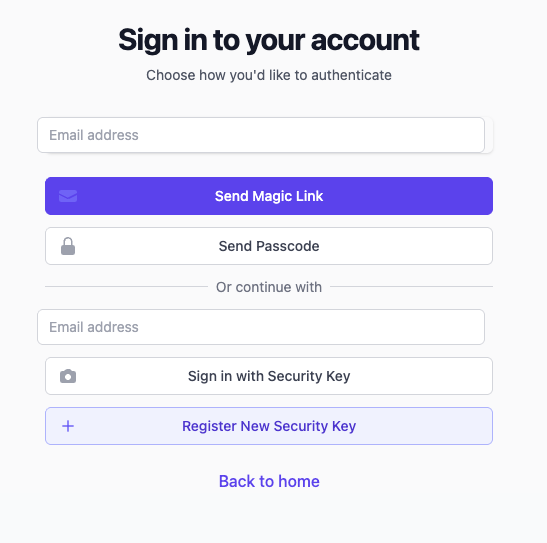
Notice the link just below the heading and byline? The 'I have no or will not disclose an email address' link will open a fresh browser tab and guide you to setting up a burner email address. Read more about BEA accounts in the section on designing for privacy.
Now equipped with an email address - this view allows you 3 ways of signing into Mortimer using:
- a magic link. This option will send you an email with a link. It will take you straight to your dashboard. A good option when you're navigating the Internet from a public place like a PC in a library, more.
- a passcode. You will get an email med a 6-digit code to type into an input that will present itself once you tap the 'Send Passcode' button. Even a good choice when logging in from devices that are not yours.
- a security key. This option is the fastest and most secure. A cryptograhic key is setup with your device and based on any available scheme, be it biometric or mathematical. Use this on your favorite devices for easy and fast access!
Signing up?
"Am I not to sign up at all?" you probably ask by now! The answer is as short as it is sweet: No! We cannot ship any meaningful signup feature without going against the design for privacy mantra, hence no signup!